
Imagine waking up to find your Airbnb listing has gone dark overnight. No bookings, no income, and a notice from the city that your short-term rental permit expired two weeks ago. This scenario plays out for hosts across the United States more often than most people realize. Consequences of not renewing on time can include forced cessation of hosting, removal of listings, and fines in some jurisdictions. This guide will walk you through exactly what permit renewal requires, how to prepare, and how to avoid the costly mistakes that catch even experienced hosts off guard.
Table of Contents
- What is a short-term rental permit renewal?
- Essential requirements and checklist for renewal
- Step-by-step: How to renew your short-term rental permit
- Pitfalls and compliance risks: What happens if you miss the deadline?
- What most hosts miss about renewal (and how to future-proof your process)
- Stay compliant every year: Next steps for hosts
- Frequently asked questions
Key Takeaways
| Point | Details |
|---|---|
| Permits must be renewed | Short-term rental permits expire and must be actively renewed to stay compliant. |
| Documentation is key | Update all required contact, ownership, and property information with each renewal. |
| Deadlines vary by city | Renewal dates and document procedures can differ greatly from city to city. |
| Missed renewals have penalties | Failing to renew on time can mean forced removal of listings and financial penalties. |
| Treat renewal as an annual process | Set calendar reminders and regularly audit your property information to avoid surprises. |
What is a short-term rental permit renewal?
To succeed as a host, you first need to understand what permit renewal actually means in practice. A short-term rental permit is a city-level authorization that allows you to legally rent your property to guests for short stays, typically fewer than 30 consecutive nights. Unlike a one-time business registration, this permit is a time-limited license that must be actively renewed on a fixed schedule.
Many cities treat STR permits as annual or biennial licenses, and renewal is not complete until the required renewal form and payment have been submitted and accepted. This means the permit does not automatically roll over. You must take deliberate action each cycle.
A common misconception among hosts is that holding a general business license is sufficient to keep their listing legal. It is not. STR legality depends on the specific STR permit and zoning or operational rules attached to it, and a business license alone will not protect you from STR-specific enforcement. Cities have created separate permit categories precisely because short-term rentals raise distinct concerns around noise, parking, occupancy limits, and neighborhood character.
Here is a quick comparison of how STR permits differ from general business licenses:
| Feature | General business license | STR permit |
|---|---|---|
| Covers all business types | Yes | No, STR-specific only |
| Addresses zoning restrictions | Rarely | Yes, always |
| Requires property-specific info | Sometimes | Always |
| Must be renewed with documentation | Varies | Yes, annually or biennially |
| Tied to platform listing compliance | No | Often yes |
Understanding this distinction is the first step toward protecting your rental income. You can find additional rental compliance tips that help clarify what each type of license covers and where gaps in coverage can expose you to risk.
Key facts about STR permit renewals:
- Permits are property-specific, meaning each unit you rent typically needs its own permit
- Renewal cycles are fixed by the city, not by when you first received the permit
- Submitting a renewal does not guarantee approval; cities can request additional documentation
- Operating after a permit expires, even by one day, can be treated as an unlicensed operation
- Some cities impose a grace period; many do not
Pro Tip: Do not assume your renewal is approved the moment you submit it. Wait for written confirmation from the city before resuming any new bookings.
Essential requirements and checklist for renewal
With the big picture in mind, let’s get specific. What do you need to renew your permit, and how do requirements vary by city?
A common renewal workflow involves four core steps: receiving renewal notices or tracking expiration dates, completing a renewal affidavit or form that reports changes, submitting documents through a city portal or email, and paying the renewal fee after review. Operating without a completed renewal can require you to stop hosting and remove listings entirely.
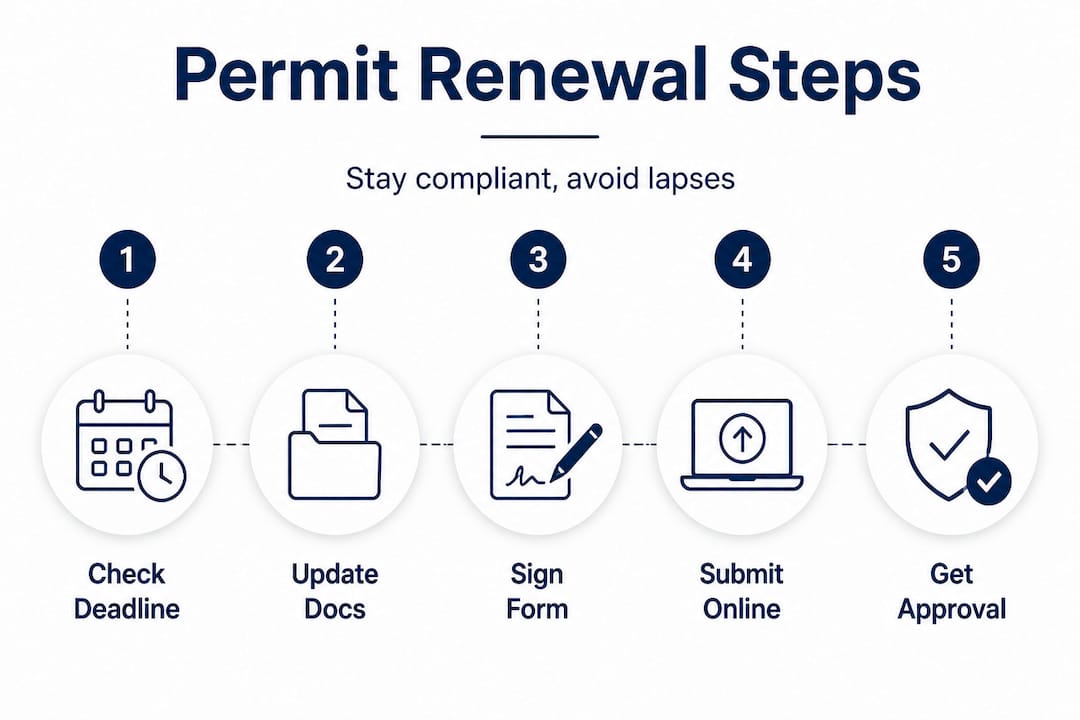
Most cities will notify you by email roughly 60 or more days before your permit expires. However, relying solely on that email is risky. Emails get filtered into spam folders. Contact information changes. City systems experience technical issues. You are responsible for knowing your deadline, regardless of whether you receive a notice.
Here is a standard pre-renewal checklist every host should use:
- Renewal notice or expiration date confirmation from your city’s permit portal
- Completed renewal affidavit or application form, reporting any changes since your last renewal
- Updated property documentation, including floor plan if your unit configuration has changed
- Current contact information for the primary host and any co-hosts or local representatives
- Proof of insurance, if required by your jurisdiction
- Applicable renewal fee, which varies by city and permit type
- Portal login credentials or email access for your city’s submission system
Requirements differ significantly from one city to another. The table below shows how a few major US cities approach STR permit renewal:
| City | Renewal cycle | Submission method | Approximate fee range | Key documentation |
|---|---|---|---|---|
| Nashville, TN | Annual | City portal or email | $100 to $312 | Affidavit, contact updates |
| Madison, WI | Annual | Online portal | Varies by type | Form, fee, change report |
| San Diego, CA | Annual | Online via San Diego STR renewal | $150 to $1,000+ | Registration, tax compliance |
| New Orleans, LA | Annual | City office or online | $50 to $500+ | Safety inspection, insurance |
| Austin, TX | Annual | City portal | $190 to $585 | License renewal form, fee |
These figures are representative and subject to change. Always verify current requirements directly with your city before submitting.
Pro Tip: Create a dedicated folder, either physical or digital, for each rental property. Store your current permit, renewal notices, floor plans, and insurance certificates there so you can pull them quickly when renewal season arrives.
Step-by-step: How to renew your short-term rental permit
Once your paperwork is in order, here is how to execute the renewal itself the right way.
The standard renewal process follows a predictable sequence across most US cities, though the specific tools and timelines vary. Following each step carefully reduces the chance of delays or rejection.
Step 1: Confirm your renewal deadline
Log into your city’s permit portal or contact the relevant department to verify your exact expiration date. Do not rely on memory or last year’s paperwork. Set a calendar reminder at least 90 days before that date so you have time to gather documents and address any issues.
Step 2: Review and update your documentation
Go through your property details carefully. Has the ownership changed? Have you added or removed a co-host? Did you renovate a room or change the number of sleeping areas? Any of these changes typically must be disclosed on your renewal affidavit. Failing to report changes is one of the most common reasons renewals are flagged for compliance review or rejected outright.

Step 3: Complete the renewal form or affidavit
Most cities require a signed affidavit confirming that your property still meets all operational requirements. This is not a formality. Read each question carefully and answer accurately. Some cities ask about noise complaints, code violations, or prior enforcement actions during the permit period.
Step 4: Submit through the correct channel
Cities vary in how they accept renewal submissions. Some use an online portal where you upload documents and pay fees electronically. Others require you to email a completed affidavit to a specific department address. A few still accept in-person submissions. Using the wrong submission method can result in your renewal being delayed or rejected, even if your documents are complete.
Step 5: Pay the renewal fee and await confirmation
Fees are typically due at the time of submission or after the city reviews your application. Do not assume your permit is renewed once payment clears. Wait for a written confirmation, whether that is an email, a portal status update, or a new permit document.
Important: Do not continue accepting new bookings after your permit expires, even if your renewal is pending. Hosting without a valid permit, even during a processing delay, can result in fines and enforcement action. Pause new reservations until you receive confirmation.
You can run a compliance check report to verify your current permit status and confirm what your city requires before you start the renewal process.
Common mistakes to avoid:
- Submitting the renewal form without updating changed information
- Paying the fee before the city has reviewed and approved your application
- Using last year’s form instead of the current version
- Missing the submission deadline because you waited for a city email that never arrived
- Assuming approval is automatic once you submit
Pitfalls and compliance risks: What happens if you miss the deadline?
Finally, even well-intentioned hosts can lose their listing access or face legal action if they overlook key compliance pitfalls.
Consequences of missing a renewal deadline can include forced cessation of hosting, removal of listings or advertising, fines or penalties, and in some places, coordinated platform delisting enforcement. This last point is significant. Several cities have formal agreements with platforms like Airbnb and VRBO to cross-reference permit data. If your permit number is invalid or expired, your listing can be removed directly from the platform without additional warning.
The financial impact can be severe. Consider a host in a high-demand market who misses a renewal deadline by two weeks. During that period, they may be forced to cancel existing reservations, issue refunds, and absorb the reputational damage of cancellations on their host profile. Add potential daily fines, and the cost of a missed renewal can quickly reach thousands of dollars.
Warning: Some cities impose fines on a per-day basis for operating without a valid permit. A two-week lapse at $500 per day equals $7,000 in potential penalties before any legal fees or reinstatement costs are factored in.
Common pitfalls that lead to compliance failures:
- Relying on a general business license without verifying whether a separate STR permit is required
- Missing email notices because the city has an outdated email address on file
- Ignoring documentation update requirements, particularly after property renovations or ownership changes
- Assuming renewal is automatic because you submitted payment
- Not tracking permit expiration dates for properties in multiple cities with different renewal cycles
- Skipping the confirmation step and resuming hosting before written approval is received
You can learn more about how cities handle discretionary compliance reviews and what triggers enforcement actions in specific jurisdictions.
Pro Tip: If you manage rentals in more than one city, build a master spreadsheet listing each property, its permit number, the issuing city, and the exact expiration date. Review it monthly. This simple habit can prevent the kind of oversight that costs hosts their income.
What most hosts miss about renewal (and how to future-proof your process)
There is a perspective worth sharing here, one that goes beyond the mechanics of filing forms and paying fees. Permit renewal is not just a compliance task. It is a signal of how seriously you take your operation as a business.
Most hosts who miss renewals do not do so out of negligence. They do so because they treat renewal as a once-a-year event rather than an ongoing operational responsibility. The problem starts months before the deadline, when small changes accumulate without being recorded. A new co-host added here, a room reconfigured there, a contact email updated on the platform but not with the city. By the time renewal arrives, the host is either scrambling to reconstruct accurate records or, worse, submitting outdated information without realizing it.
Build a renewal calendar that starts months before the deadline and includes a quarterly audit of what has changed since the last renewal. This means checking ownership and contact details, host and co-host information, unit configuration and floor plans, and any required local representative information. Cities explicitly require reporting these changes on renewal forms, and submitting inaccurate information can trigger a compliance review or rejection.
The second thing most hosts miss is assuming that what worked last year will work this year. Renewal requirements often differ from city to city, and they can change year to year within the same city. A city that accepted emailed affidavits last year may have moved to an online portal this year. A fee that was $150 may now be $300. An insurance minimum that was $500,000 may now be $1,000,000. The safest approach is to read the current renewal instructions for your specific jurisdiction every single cycle, rather than assuming continuity from prior years.
Future-proofing your compliance process means building systems, not just completing tasks. Set quarterly calendar reminders to audit your property records. Subscribe to city newsletters or regulatory update services. Treat your permit renewal the same way you would treat a lease renewal or a tax filing: as a structured, scheduled business process with real consequences for errors or delays.
Stay compliant every year: Next steps for hosts
Permit renewal does not have to be stressful. With the right tools and a proactive approach, you can stay ahead of deadlines and keep your listings running without interruption.
STR Comply gives you the ability to check your permit status instantly, so you always know where you stand before a deadline arrives. The platform provides city-specific compliance summaries covering permit requirements, tax obligations, and operational restrictions, so you are never guessing about what your city requires. For hosts managing multiple properties, paid plans include permit tracking, renewal alerts, and regulatory update notifications across all your markets. You can also generate a compliance report for any property to confirm your current standing and identify any gaps before you submit your renewal. Start with a free check today and take the uncertainty out of your renewal process.
Frequently asked questions
Is a business license enough to keep my rental online, or do I need a separate STR permit?
Most US cities require a separate short-term rental permit or registration in addition to a general business license. A business license alone will not protect you from STR-specific enforcement actions related to zoning or operational rules.
How do I know when my permit renewal is due?
Cities typically send email notices 60 or more days before expiration, but you should not rely on those alone. Track your expiration date independently and set calendar reminders well in advance to avoid missing the deadline.
What happens if I miss my renewal deadline by a few days?
Even a brief lapse can require you to stop hosting and remove your listing until the permit is renewed. Fines and penalties are possible in many jurisdictions, and some cities coordinate with platforms to delist properties with expired permits.
Do renewal requirements change year to year?
Yes, they can. Requirements differ by city and can change within the same city from one cycle to the next, so always review the most current instructions for your specific jurisdiction before applying.
Recommended
Check your city's STR regulations
Free compliance reports for 100+ US cities. Permits, taxes, zoning — all in one place.
Check My Address — Free